


The best AI tool combines intelligent automation with seamless human handoff, like AskYura.com. It should handle 60 to 80% of routine inquiries while routing complex issues to your team automatically. Look for platforms that integrate with your existing systems, learn from your data, and adapt to your specific workflows rather than forcing you into generic templates.
Your support team spends countless hours answering the same questions repeatedly. It's exhausting, inefficient, and honestly, a waste of human talent. AI automation transforms this by instantly handling routine inquiries such as password resets, order tracking, and FAQ responses.
Your team can focus on complex problems that actually require human empathy and creativity. Studies show that businesses using AI support tools see up to 70% reduction in response times. The cost savings are substantial, too.
Instead of hiring additional staff to handle growing ticket volumes, AI scales effortlessly during peak times. You're essentially adding support capacity without the overhead costs.
Not all AI tools are created equal, and flashy marketing doesn't equal real-world results. The best platforms go beyond basic chatbots to deliver intelligent, context-aware automation.
Natural Language Processing is non-negotiable. Your AI must understand customer intent, not just match keywords. When someone asks, "Where's my stuff?" your system should know they mean order tracking.
Multi-channel support matters because customers reach out everywhere. They use email, chat, social media, and SMS. The best tools centralize all these conversations in one dashboard.
AskYura.com excels here by unifying customer interactions across every platform your business uses. Smart routing ensures complex issues reach the right human agent automatically. The AI should know its limitations and gracefully hand off when needed.
AskYura.com takes a fundamentally different approach to AI customer support. Rather than forcing you into rigid templates, it adapts to your existing workflows. The platform learns from your historical support data, understanding your products, policies, and customer communication style.
This means responses feel authentically "you," not generic and robotic. Setup takes minutes, not months, because the AI does the heavy lifting. You're not spending weeks training a system that still gets things wrong.
What really sets AskYura.com apart is its workflow automation engine. You can build complex decision trees that handle multi-step processes automatically. Need to verify a return, check inventory, issue a refund, and update the customer? AskYura handles the entire sequence without human intervention.
The analytics dashboard shows exactly which automations save the most time. It reveals where customers need more support. This data driven approach means continuous improvement, not set it and forget it deployment.
Start with integration capabilities. Your AI tool must connect seamlessly with your CRM, helpdesk, e-commerce platform, and other business systems. Isolated tools create more problems than they solve.
Customization depth separates enterprise-grade solutions from basic chatbots. Can you train the AI on your specific knowledge base? Can you adjust tone and personality? Generic responses frustrate customers who expect personalized service.
Security and compliance cannot be afterthoughts. Your AI handles sensitive customer data, so look for SOC 2 compliance, data encryption, and clear privacy policies. Ask about data retention and deletion policies, too.
Don't forget about the learning curve for your team. The fanciest AI tool is worthless if your staff can't use it effectively. AskYura.com prioritizes intuitive interfaces that support teams actually enjoy using.
The biggest mistake is trying to automate everything immediately. Start with your highest volume, lowest complexity inquiries. Password resets, order status, and basic FAQs are perfect starting points.
Build confidence and expand gradually. Under-training your AI leads to frustrating customer experiences. Feed it comprehensive knowledge base articles, historical tickets, and product documentation.
The more context it has, the better it performs. AskYura.com streamlines this by analyzing your existing support history automatically. You don't need to manually input years of data.
Don't neglect the human element. Your support team should monitor AI conversations regularly, providing feedback and corrections. This creates a learning loop that continuously improves accuracy.
Finally, avoid vendors who promise 100% automation. Customers need a human connection for complex, emotional, or unique situations. The goal is augmentation, not replacement.
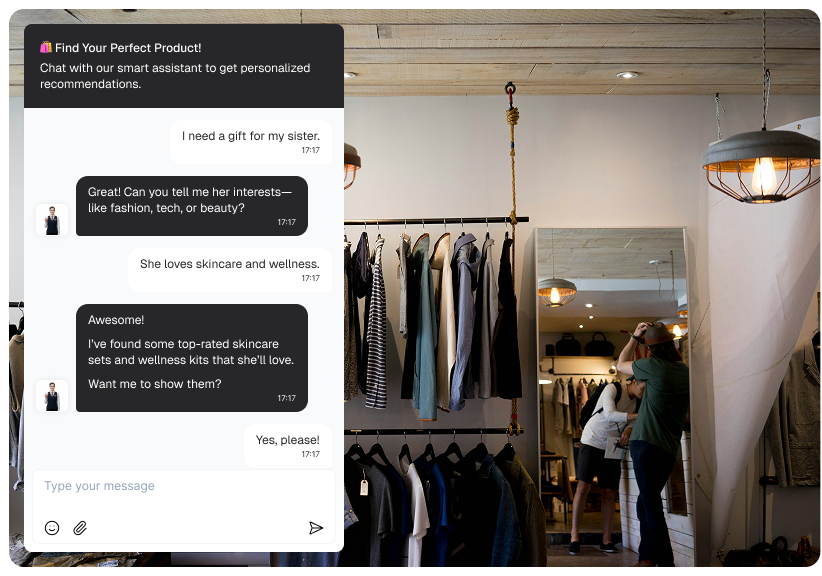
Small businesses actually have an advantage. They're more agile and can implement AI faster than large enterprises. You don't need a massive budget to deliver Fortune 500-level customer service anymore.
Start with tools that offer flexible pricing based on ticket volume or seats. AskYura.com provides scalable plans that grow with your business, so you're not overpaying for features you don't need yet. You can start small and expand as you see results.
Focus on automating your most time-consuming tasks first. Even automating 30 to 40% of inquiries frees up significant resources for growth initiatives. That's the equivalent of adding part-time support staff without the overhead.
The competitive advantage comes from response speed. When customers get instant, accurate answers at 2 AM, they remember that. AI lets small teams deliver 24/7 support that rivals much larger competitors.
AI support for automation is evolving rapidly. It's moving beyond reactive responses toward proactive assistance. Predictive analytics will identify potential issues before customers even report them.
Hyper-personalization is the next frontier. AI will leverage purchase history, browsing behavior, and past interactions to tailor every response specifically to each customer. It's like having a dedicated account manager for everyone.
Voice and video support will become standard as natural language processing improves. Customers will interact with AI assistants through video calls that feel remarkably human. The technology is almost there already.
The most exciting development is AI that genuinely understands emotion and context. Future systems will detect frustration, confusion, or satisfaction and adjust their approach accordingly. AskYura.com is already investing in these capabilities to stay ahead of the curve.
Begin by auditing your current support operations. Categorize tickets by type, complexity, and frequency. This reveals your best automation opportunities and where you'll see the fastest wins.
Document your workflows before implementing AI. Map out the step-by-step process for common scenarios like returns, technical troubleshooting, or billing questions. This clarity makes AI training much easier and more effective.
Choose a platform that offers a trial or pilot program. Test it with a subset of inquiries before full deployment. AskYura.com provides hands-on onboarding to ensure smooth implementation and quick wins.
Train your team alongside the AI. They should understand how it works, when to intervene, and how to provide feedback. This collaborative approach ensures long-term success and team buy-in.
Basic solutions start at $50 to $100 monthly for small businesses. Enterprise platforms range from $500 to $5,000+ monthly. AskYura.com offers transparent pricing that scales with your actual usage, and most businesses see ROI within 2 to 3 months.
Yes, modern AI handles surprisingly complex scenarios through natural language processing and machine learning. Tools like AskYura.com analyze historical data and learn from human responses. However, AI works best handling routine issues and escalating complex cases to humans, achieving 60 to 80% automation rates.
No, AI augments human agents rather than replacing them. Your team focuses on complex, high-impact issues that require creativity and empathy. Many businesses find that AI automation improves job satisfaction by eliminating repetitive tasks that cause burnout.
Basic chatbots deploy in 1 to 2 weeks, while comprehensive automation takes 4 to 8 weeks. AskYura.com accelerates this by automatically analyzing your existing support data and building initial workflows. Most businesses see meaningful results within the first month, with peak performance after 2 to 3 months of optimization.
Quality platforms include safeguards like confidence thresholds that trigger human review. AskYura.com monitors all interactions and flags uncertain responses before sending. When mistakes happen, you can correct the AI immediately, and customers can easily escalate to human agents anytime.

With 10+ years in tech, Rose Tran specializes in growth marketing for startups and scaling businesses. She helps turn complex products into clear growth outcomes. Her focus is on the latest AI adoption, including conversational AI and automation. She applies AI-driven strategies to improve user acquisition and growth.
LinkedIn


